
Voice Recognition
Voice Recognition receives transcribed speech from the streaming PC and runs matching Voice Commands as the Broadcaster. The spoken line is not posted to Twitch. Custom Commands are not matched from speech.
Zip: voice-recognition.zip
flowchart LR
    A[Handy Post-Processing] --> B[PC Agent :28787]
    B --> C[GRiMbot]
    C --> D[Voice Command match]
    D --> E[Action Chain as Broadcaster]
Third-party requirements
- Handy on the streaming PC. Free, local, push-to-talk.
- Pick a small English model. Enable Post Processing. Create a prompt whose body is only
${output}and select that prompt. - The PC Agent running (
start-streamerbot-agent.bat). STREAMERBOT_AGENT_TOKENset on the bot and in the agent.
Name versus Phrase
| Field | Role |
|---|---|
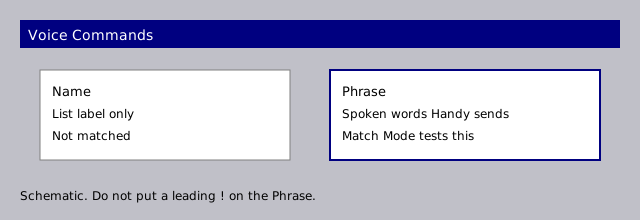
| Name | Label in the Voice Commands list only. It is not matched. |
| Phrase | The spoken words GRiMbot looks for in transcribed text. |
| Match Mode | Start, Exact, or Anywhere. Same meanings as Custom Commands, applied to the Phrase. |
Do not put a leading ! on the Phrase. GRiMbot does not add one.
Setup
- Install Handy as described above.
- Open Recognition Settings. Tick Integration enabled. Click Save.
- Click Download PC Agent. Extract it on the streaming PC and leave it open until the lamp is green.
- In Handy, set the Custom post-processing base URL to
http://127.0.0.1:28787/v1. Leave the API key blank. Choose grimbot-voice if Handy asks for a model. - Open Voice Commands. Set Name for the list. Set Phrase to the spoken words. Choose Match Mode. Add actions. Save.
- Hold Handy's Post-Processing hotkey, say the Phrase, and release.
The normal transcribe hotkey writes Handy History only. It does not send text to GRiMbot.
Test text in Recognition Settings sends a typed line the same way Handy would. Handy is not required for that test.
Other programs on the streaming PC can POST {"text":"..."} to http://127.0.0.1:28787/voice.
Last received shows the most recent text and when it arrived. If that never updates, Handy is not reaching the agent, or the agent is not reaching GRiMbot.